What is Pickscan Print?
Pickscan Print is a small app for the computer at your packing bench. Once it is connected to your Pickscan account, labels and documents sent from Pickscan print on that computer's printers straight away, with no print dialogs or downloads.
What you need
- A computer running Windows 10 or 11, macOS, or Linux, that stays on while you pack.
- Printers connected to that computer — a label printer (for example a Zebra) for shipping labels, and any ordinary printer for documents such as invoices and packing slips.
- An internet connection on that computer.
- Access to your Pickscan admin, to connect the computer.
Each company has one print station. Every print job goes to that one computer, so there is never any doubt about which bench a label comes out at. To use a different computer, remove the old print station first — see Moving or uninstalling Pickscan Print.
How it works
-
Install it on the packing-bench computer
Download Pickscan Print from your Pickscan admin and install it. It starts automatically each time you log in to the computer.
-
Connect it with a device code
Your admin gives you a one-time 8-digit device code. Enter it in Pickscan Print and the computer is linked to your account. The code only works once and expires after a few minutes.
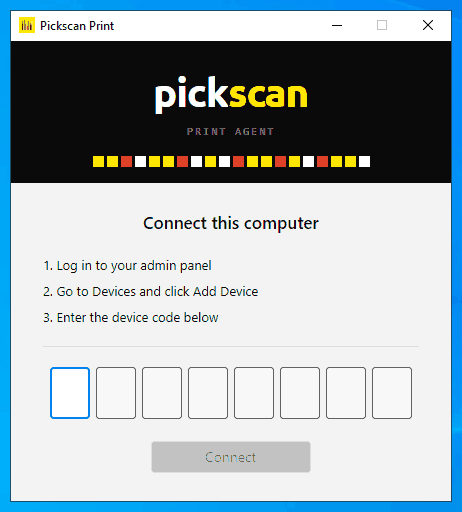
Enter the 8-digit device code to connect this computer -
Choose your printers
The printers on that computer are listed under Printers. Mark each one as
LabelorPaperand send a test to check it. For shipping labels, open Settings… on your label printer and tick Use for shipping labels.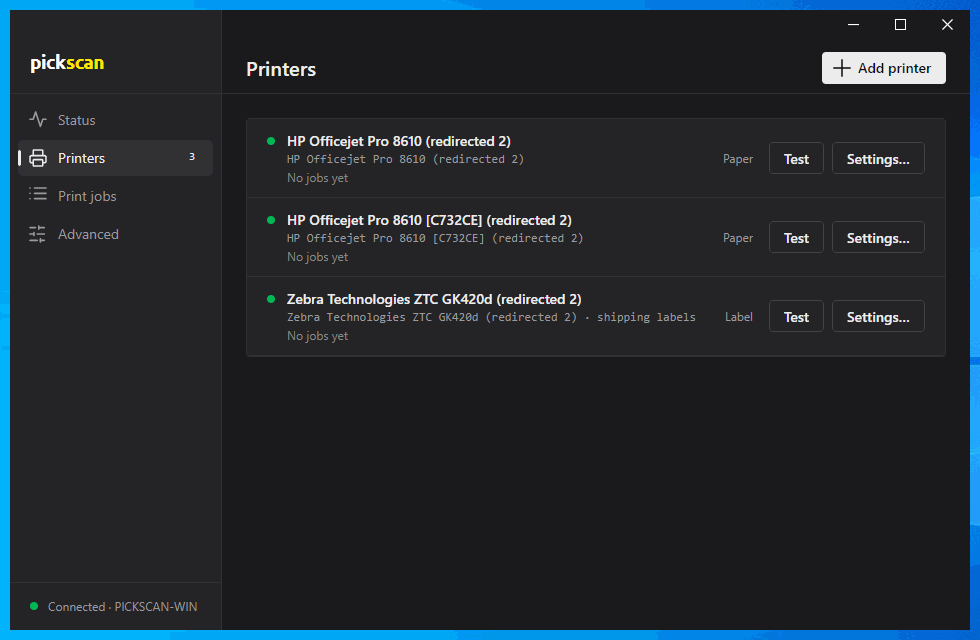
Printers, with the Zebra marked for shipping labels -
Print from Pickscan
Anything Pickscan sends to a printer now comes out on the computer at your bench. Pickscan Print keeps a history under Print jobs, so you can see what printed and when.
Tips
- It lives in the notification area. Closing the window doesn't stop it — Pickscan Print keeps running from the icon next to the clock.
- It updates itself. New versions install automatically when nothing is printing.
- Keep the computer awake. If it sleeps, jobs wait until it wakes up again.